
Android app
PharmHops: the Android app for HopMeds pharmacy and clinic staff in Nepal
PharmHops puts HopMeds, the pharmacy software built for Nepal, onto an Android phone: the same login and the same records, in Nepali or English. It is free to install from Google Play and needs an approved HopMeds account and an internet connection. It is for the staff who run a pharmacy or clinic in Nepal, not for buying medicines.
The same HopMeds, on your Android phone
PharmHops opens the staff workspace that runs at pharmhops.com/app. A bill made on the phone is on the counter computer at once, and the other way round, because both are the same hosted HopMeds. There is nothing to copy across and nothing to sync.
The layout changes to fit a phone. Dashboard, Billing and Inventory sit in a bar at the bottom, More opens every other section your role allows, tables turn into cards, and quantity and price boxes bring up the number keypad.
- Same login, roles and records as in the browser
- Nepali and English, switched from the sign-in screen or the menu
- Free to install, with no ads and no in-app purchases
- Android 7.0 or newer
PharmHops on an Android phone
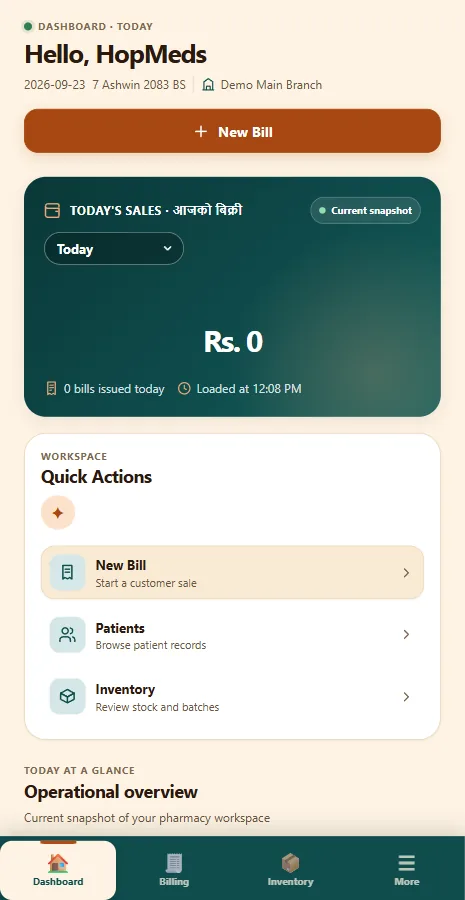
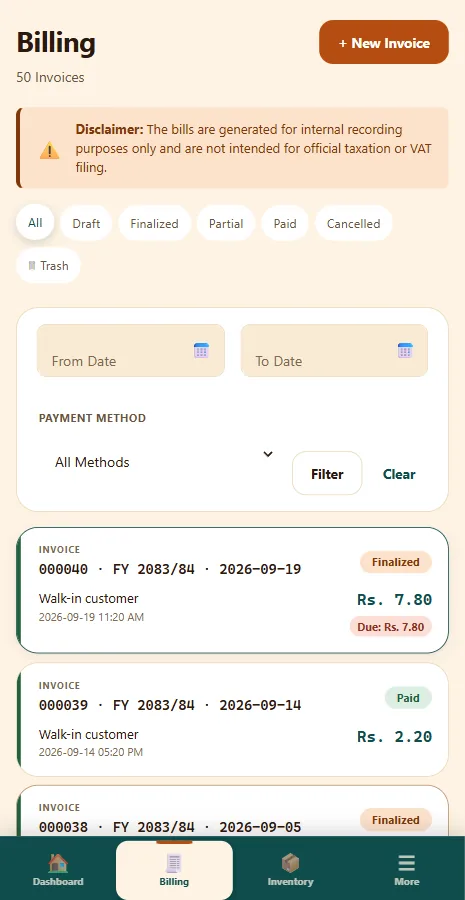
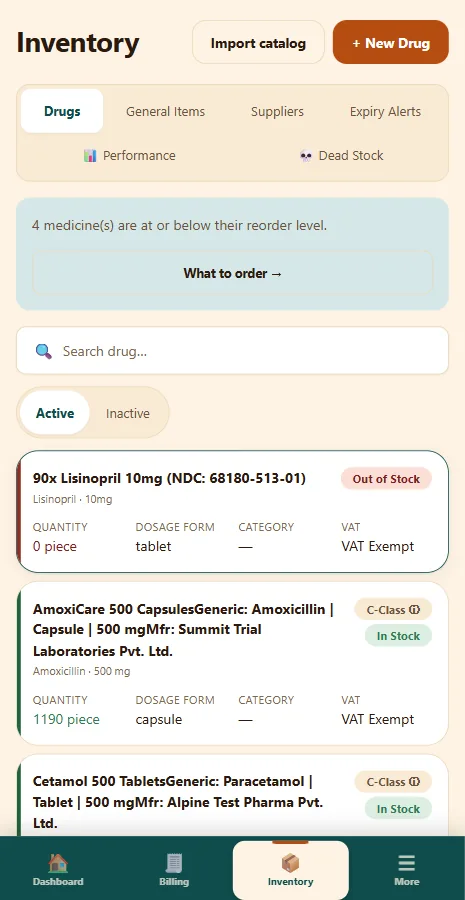
These screens are from a demonstration pharmacy. No real patient or customer is shown.
Bill a customer from the phone
Start with New Bill on the Dashboard. Pick a patient or a walk-in customer, find each medicine by brand, generic or Nepali name, and HopMeds suggests the batch that expires first. Give a discount on the whole bill, save it as a draft or finalize it, then record a full or part payment.
Receipt (PDF) saves the receipt on the phone and opens it in your PDF viewer. The app itself cannot print. To print, use the viewer's print option if it has one, or open HopMeds in a browser on the counter computer.
More on bills and receipts: Billing & VAT bills
- First-expiring batch suggested; expired batches cannot be sold
- 13% VAT added on taxable items when the pharmacy is VAT-registered
- Payments recorded as cash, card, eSewa, Khalti, ConnectIPS, bank transfer or cheque
- A scan-to-pay QR with the amount due, once your bank QR is saved
Check stock, expiry and dues away from the counter
Search your medicines by brand, generic or Nepali name, or by manufacturer. Each one shows its quantity with an In Stock, Low Stock or Out of Stock tag, and opening it lists every batch with its expiry, quantity and price, with the batch to sell first marked.
Expiry Alerts lists batches that have expired or will expire within 90 days. Owners and accountants also see Who owes: every customer with an unpaid balance, how much, and how old the oldest unpaid bill is.
More on stock and Khata: Batch stock & expiry
- Receive stock by batch: expiry, quantity, cost and selling price
- A count of medicines at or below their reorder level
- Dues shown for one branch or the whole pharmacy
- Each person sees only what their role allows, as on a computer
Let the camera do the typing
When you add a new medicine, photograph its label and HopMeds fills in the blank fields it can read, such as name, strength, batch number, expiry and MRP, for you to check and correct. Where your plan includes the prescription register, photograph a paper prescription, then check and complete the doctor, date and medicines before saving.
Android asks for the camera only when you tap a photo button, and you can pick an existing picture instead. Photos go to the HopMeds server to be read, and it may pass them to Google's Gemini service to do so, as our Privacy Policy explains, so this needs internet too. The camera is the only permission the app asks you to approve.
- What the photo gives is a draft: nothing is saved until you confirm
- The app keeps a photo only in its private storage and clears it by itself
- No location, contacts or microphone access
- Label reading: 50 a month on Basic, 150 on Plus, 30 in the trial, unlimited on Pro
Who can sign in, and what it costs
PharmHops is free to install. Signing in needs an approved HopMeds account: we review each pharmacy's request before creating it, and the owner then adds staff logins. Installing the app does not create an account, and the app has no sign-up screen.
Requesting access, choosing a plan and paying for it are done in a browser at pharmhops.com, not in the app. HopMeds is a paid service after the trial, and the same plan applies in the app as in the browser.
- Request access on pharmhops.com, then sign in on the phone
- Each staff member signs in with their own login
- Forgot password works from the sign-in screen
- Delete your own account in Settings, under Compliance
What the app needs, and what stays on the phone
PharmHops needs Android 7.0 or newer and an internet connection for every screen. If it cannot load, it shows a “Can’t reach PharmHops” screen with a Retry button; if the connection drops while you work, the action fails with a network error. Nothing is kept to send later. The Google Play version opens only pharmhops.com, over HTTPS, so a pharmacy on a local installation uses a browser on the shop network instead.
The app keeps you signed in on the phone until you sign out or the session ends. Receipts and exports you download stay on the phone as ordinary files, even after you sign out, and can show patient names. Today the app saves them in its own folder, which Android deletes when you clear the app's storage or uninstall the app, so do that before a shared phone changes hands.
How we handle data: Privacy Policy
- Opens only pharmhops.com, always over HTTPS
- Signing out removes your sign-in from the phone
- Links to other websites open in your phone's browser
- The app opts out of Google cloud backup
Outside Nepal? What to know first
PharmHops is on Google Play in Nepal and in a number of other countries, but HopMeds is built for pharmacies in Nepal. Bills are in Nepali rupees, VAT is Nepal's 13% rate, receipts carry BS dates, Nepal's fiscal year and Nepal time, and the screens are in English and Nepali. None of that can be changed for another country today.
Plans are priced and paid in Nepali rupees too. If your pharmacy is outside Nepal, write to us before you request access, and we will tell you plainly what will fit and what will not.
Write to: info@hopmeds.com
- Nepali rupees (Rs.) on screen and on receipts
- Nepal's 13% VAT for VAT-registered pharmacies
- BS dates and the fiscal year that starts in Shrawan
- English and Nepali screens
What HopMeds does not claim: PharmHops is not an app for buying or ordering medicines, and patients cannot sign in. It does not work without internet, sends no notifications, does not read barcodes, and cannot print or connect to a printer. Requesting an account and paying for a plan happen in a browser, not in the app. There is no iPhone or iPad app; on those devices HopMeds runs in the browser. HopMeds is not on the IRD's enlisted software list, and its Billing screen says its bills are not intended for official taxation or VAT filing.
Questions about the PharmHops app
Is the PharmHops app free?
It is free to install from Google Play, with no ads and no in-app purchases. Using it needs a HopMeds account, and HopMeds is a paid service after the trial, so your pharmacy's plan applies in the app as it does in the browser.
Where do I download PharmHops, and is there an APK?
Install it from Google Play, where it is listed as PharmHops by the developer HOPMEDS. Google Play is where the app and its updates are published; this website does not host an APK file.
Who can sign in to PharmHops?
Staff of a pharmacy or clinic that has a HopMeds account. We review each pharmacy's request before creating its account, and the owner then adds staff logins. The app has no sign-up screen, so request access at pharmhops.com first.
Does PharmHops work without internet?
No. It shows the hosted HopMeds service, so every screen needs a connection. Opened without one, it shows a retry screen; if the connection drops mid-task, the action fails with a network error, and nothing is stored to send later.
Can I print a receipt from the app?
Not from the app itself. Receipt (PDF) saves the receipt on the phone and opens it in your PDF viewer; if that viewer can print or share, you can do it from there. For everyday receipt printing, use HopMeds in a browser on the counter computer.
Can I order or buy medicines in PharmHops?
No. PharmHops is for the staff who run a pharmacy or clinic: billing, stock, dues and records. It is not a shop, it does not deliver medicines, and patients cannot sign in.
Is there a PharmHops app for iPhone?
No. There is no iPhone or iPad app. On Apple devices, open pharmhops.com/app in Safari and add it to your home screen.
Is PharmHops the same as HopMeds?
Yes. HopMeds is the pharmacy software, PharmHops is the name of its Android app, and pharmhops.com is its website. On Google Play the developer name is HOPMEDS.
Is PharmHops IRD approved?
No. HopMeds is not on the IRD's list of enlisted billing software and sends nothing to the IRD, and its Billing screen says its bills are not intended for official taxation or VAT filing.
Related
Get your pharmacy set up
Tell us about your shop and we will get you running — including moving your current stock list in.
Or call us directly: +977-9768542410